Digital Seating Charts for Weddings: The 2026 Trend That Replaces the Poster Board

Digital Seating Charts Are the 2026 Wedding Trend That Replaces the Poster Board for Good
We’ve said goodbye to a lot of old school wedding traditions over the past few years. Bouquet tosses. Garter throws. The chicken dance (finally). And now, the giant poster board at the entrance to your reception is next on the list.
The digital seating chart is one of the biggest upcoming wedding trends of 2026, and we’re completely here for it. Instead of squinting at tiny names on a mirror, acrylic sign, or poster, guests scan a QR code with their phone and find their table in seconds. No line. No crowding. No squinting. Just a quick scan and they’re on their way to their seat.
If that sounds like the kind of thing that only works at tech heavy weddings, think again. We’ve seen this setup at rustic barn celebrations, black tie ballroom receptions, and vineyard weddings alike. It works everywhere because every guest already has the tool they need in their pocket.
One of our favorite tools making this happen is Wedibox’s digital seating chart, which lets you build your chart, assign tables, and generate a QR code that guests scan on their phone. It’s one of those things that sounds too simple to be real, but it works beautifully. And we’re going to walk you through all of it.

Why Couples Are Ditching Traditional Seating Displays
If you’ve ever been to a wedding with 150 or more guests, you know the scene. Everyone arrives at the same time. There’s one seating chart by the door. And suddenly there’s a traffic jam of people trying to read a poster from three feet away while holding a cocktail.
That bottleneck is one of the biggest complaints wedding planners hear, and it’s one of the main reasons the digital seating chart wedding trend is taking off. But it’s not just about the line at the door. Here’s what else is driving the shift.
Last minute changes are almost guaranteed. About 70 to 80 percent of weddings have seating changes after the chart is finalized. A guest cancels. A plus one gets added. Someone switches tables because of a family situation. When your chart is hand painted on a mirror or printed on a $200 acrylic sign, every change means starting over. We’ve heard from couples who reprinted their seating chart three times before the wedding. One bride told us she was hand correcting a calligraphy sign with a Sharpie at 11 PM the night before. Not the vibe.
Weather ruins everything. Escort cards blow off the table at outdoor weddings. Poster boards warp in humidity. Vinyl lettering peels off in direct sun. If you’re planning a garden, vineyard, or beach wedding, your printed display is one strong breeze away from chaos.
Printed displays are expensive. Between custom calligraphy ($2 to $5 per name), professional printing, and the almost certain reprint, most couples spend $150 to $400 on a seating display that only gets used for about 20 minutes. That’s a lot of money for something that sits by the door.
Older guests struggle with small fonts. This is the one people don’t think about until it’s too late. A beautiful seating chart in elegant script looks amazing in photos but can be really hard to read for grandparents and older guests, especially in a dimly lit reception space. A phone screen lets each guest zoom in and search their own name at their own pace. It’s more accessible, and it saves them from awkwardly asking a stranger to help them read the board.
How a Digital Seating Chart Actually Works
The concept is simple and that’s the whole point. Here’s how a QR code seating chart works from start to finish:
You build your chart online. Add your guests and assign them to tables. Most tools use a drag and drop setup, so it works the way you’d expect. If RSVPs are still coming in, no problem. You can adjust right up to the day of.
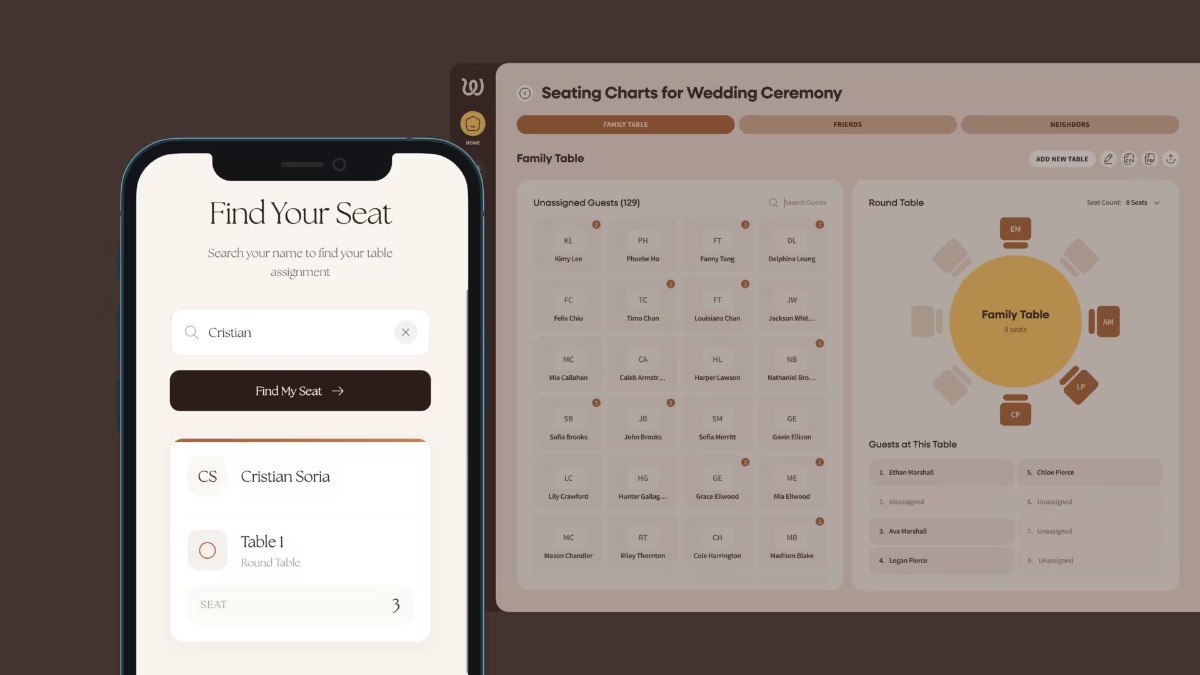
You get a QR code. Once your chart is ready, the tool gives you a QR code that links to your seating chart page. You download it and drop it into a sign, a card on each table, or a framed display at the entrance. Guests scan and search. They pull out their phone, point the camera at the code, and tap the link. A search bar pops up. They type their name, see their table number, and walk to their seat. The whole thing takes about five seconds.
You update any time you need to. This is the part that makes the biggest difference. If you swap tables the morning of your wedding, the QR code stays the same. Guests just see the newest version when they scan. No reprints. No panic.
Why We Love Wedibox for This
There are a handful of digital wedding seating chart tools out there, but the one we keep coming back to is Wedibox. Here’s why.
First, it’s not just a seating chart. Wedibox is a full wedding seating chart app that also includes photo sharing, an audio guestbook, a written digital guestbook, a live wedding slideshow, and RSVP tools. All of it runs through one QR code and one wedding page. So your guests scan once and get access to everything.
The seating chart setup is simple. You add your guests, drag them into tables, and toggle the chart on. Wedibox generates your QR code and even gives you free Canva compatible signage templates so you can make a beautiful "Find Your Seat" sign that matches your wedding colors. The whole setup takes about 15 minutes.
What really sets it apart is the guest side. When someone scans the code, they see a clean search bar. They type their name. They get their table. That’s it. No app to download. No account to create. No login screen. It works on any phone, in any browser. Your 85 year old grandmother and your tech savvy college friend have the exact same experience.
And if you’re planning a multicultural wedding, you can add bilingual instructions to your signage so guests in both languages know exactly what to do.
Where Digital Seating Charts Really Shine
This setup works great at any wedding, but there are a few situations where it goes from "nice to have" to "absolute lifesaver."
Big guest lists. The bigger your wedding, the worse the poster board problem gets. With an online seating chart wedding setup, you can place two or three QR code signs near the entrance and spread guests across multiple scanning points. No bottleneck. No line. Dinner starts on time.
Eco conscious couples. If you’re trying to reduce waste on your wedding day, a digital chart is the easiest swap you can make. No printed poster. No disposable escort cards. No reprints in the recycling bin. It’s one of those small choices that adds up, especially when combined with digital invites and online RSVPs.
Outdoor and destination weddings. Paper and wind don’t mix. Neither do poster boards and humidity. A digital chart lives on your guests’ phones, so it doesn’t care what the weather does. If you’re saying your vows at a vineyard, on the beach, or at a destination venue, this is the safest play.
Weddings with a lot of last minute changes. If you’re the couple who’s still finalizing RSVPs a week out (that’s most couples, by the way), a digital chart gives you the freedom to keep adjusting without any stress. Change a table at 8 AM on your wedding day and it’s live by the time guests arrive.
Multicultural celebrations. When you have guests who speak different languages, fitting bilingual text onto a printed chart gets tight fast. A QR code sign with simple instructions in two languages keeps things clean and easy for everyone.
Couples who love a clean, modern look. If your wedding inspiration leans minimal, a small framed QR code sign is a lot more on brand than a giant board covered in tiny names. Less clutter, more style.
Can You Combine Digital With a Physical Display?
Yes. And honestly, some of the best setups we’ve seen do exactly that.
Picture a beautiful welcome sign at the entrance: your names, your wedding date, a gorgeous design that matches your invitations, and a QR code at the bottom that says "Scan to find your seat." The sign is the decor piece. The QR code does the work.
You can also keep a simple backup nearby, like an alphabetical list on a clipboard or tablet for any guest who doesn’t want to scan. It takes 30 seconds to print and covers every situation.
Another option we love: using a vintage mirror or acrylic sign as the decor piece, but instead of listing every name, it just says "Scan to find your seat" with the QR code below. You still get the beautiful display for photos. The QR code handles the practical stuff. It’s a setup that looks intentional rather than techy.
This combo approach gives you the visual impact of a traditional display with the flexibility and speed of a digital one. Best of both worlds.
What It Costs Compared to Traditional Options Budget matters.
Here’s how the most common seating display options stack up:
Calligraphy mirror or acrylic sign: $150 to $400 depending on size and artist. Corrections or reprints add more. Great for photos but zero flexibility once it’s done.
Escort cards with calligraphy: $2 to $5 per card. For 150 guests, that’s $300 to $750. They look stunning, but one gust of wind at an outdoor wedding and they’re across the lawn.
DIY printed poster: $20 to $60 at a print shop. Budget friendly, but you’ll probably reprint at least once. Couples who pulled off a beautiful DIY wedding on a budget know every dollar counts, so even a $40 reprint stings.
Digital seating chart (Wedibox): Included with the platform alongside photo sharing, guestbooks, and more. No printing costs. No shipping. No reprints. Update it forever. The most budget friendly and most flexible option by a wide margin. When you factor in the near certainty of at least one reprint, the digital option isn’t just cheaper up front. It saves you the hidden costs that catch most couples off guard.
How to Set Up Your Digital Seating Chart in 15 Minutes
Here’s the step by step if you want to get started:
Step 1: Create your event on Wedibox. Sign up and set up your wedding page. This is where your seating chart (and everything else) will live.
Step 2: Add your guests and assign tables. Drag names into table groups. Rearrange as RSVPs come in. The interface is simple and works the way you’d expect.
Step 3: Turn on the seating chart. One toggle makes your chart visible to guests who scan the QR code. You control when it goes live.
Step 4: Download your QR code and design your signage. Grab your code and drop it into one of Wedibox’s free Canva signage templates. Pick a design that matches your wedding aesthetic, adjust the colors, and print. Ten minutes, tops.
Step 5: Place your signs and relax. Set up one sign by the entrance and a couple more near the bar or cocktail area. If you have a large guest list, spreading out the QR codes keeps things moving even faster. Pro tip: put a small card with the QR code on each reception table too. That way any guest who missed the entrance sign can still scan from their seat.
That’s it. No calligrapher. No print shop. No 11 PM panic with a Sharpie. And if Uncle Dave texts you the night before to say he’s bringing his new girlfriend, you just open the app, add a name, and move on with your life.
This Is the Year to Go Digital
The digital seating chart isn’t a gimmick or a shortcut. It’s a better way to handle one of the most stressful parts of wedding planning. It saves you money. It saves you time. It makes the entrance to your reception smoother for every single guest. And it gives you the freedom to make changes whenever you need to without a single reprint.
Think about it this way. You spent months picking the right venue, the right flowers, the right playlist. Your reception entrance deserves the same thought. And in 2026, the smartest couples are choosing a setup that looks beautiful, works for every guest, and never needs a Sharpie correction at midnight.
2026 is the year more couples are choosing tech that actually makes their wedding day easier. And this is one of the smartest moves you can make. Browse real weddings for more ideas on styling every detail of your reception, and get your seating chart QR code set up before the RSVP deadline hits. Future you will be so glad you did.
- Digital Seating Chart: Wedibox